blog

Version Control for LiveCode

by Heather Laine on October 8, 2013 No comments

Reprinted from revUp, read the rest of our twice monthly newsletter here.

When I work in other languages I’ve come to depend on version control to help me keep track of everything. I would like to see the same productivity increases and extra documentation trail that version control provides in my LiveCode projects. Unfortunately LiveCode files are a binary format which is great if you want to pack a lot of data into a small space but not so great if you want to have a version control system work out the difference between two versions of a file. Most version control systems will just decide if a file is text or binary and if it’s binary just treat any difference as a merge conflict.

It is possible to install additional drivers for these systems to deal with binary files or structured data like xml in a better way than line by line processing. Unfortunately hosted repository sites like GitHub and BitBucket would still see the files as binary so we wouldn’t gain benefits like being able to comment on specific changed lines in a script. Apps like SourceTree (Atlassian’s Git/Mercurial client) also wouldn’t be able to show us the differences. So we need a text based file format.
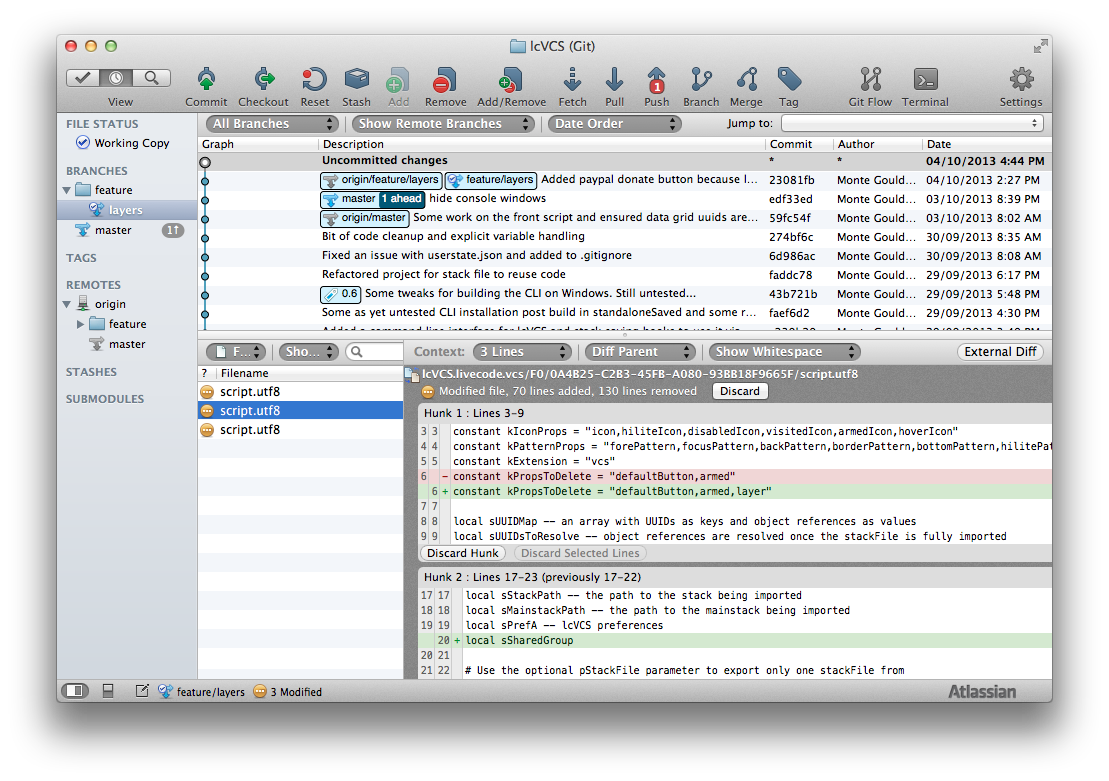
The lcVCS repository

The lcVCS repository in SourceTree (click to zoom)

Towards the end of last year (I’ve been working on this for a while) I decided I would try and crack this nut. Along the way the project (lcVCS) has been a driver for me to do some work on the LiveCode engine including `_internal resolve image`, `the childControlIDs of group|card`, `the cardIDs of group`, `the properties of object` and `is an ascii string`. Additionally I’ve filed half a dozen bug reports on obscure issues that may not otherwise have been identified such as the minuscule rounding error on gradient ramps I found recently. As a result it requires version 6.1.1 of LiveCode.

At first I took a look at what had been done before. Mark Wieder has done a considerable amount of work on this issue with exported stackFiles saved as XML with a directory structure mirroring the stackFile hierarchy. I made contact and told him I was looking at the problem and he has offered a wealth of advice and been my goto guy on this ever since.

I was inspired by Vincent Driessen’s article ‘A successful Git branching model’ so my focus since the beginning has been to ensure we can have multiple development branches of a LiveCode project open at the same time. That means we need to be able to merge these branches so that changes on both are kept. Mark’s work had proved you could reliably export and import a stackFile. When I came to look at the merge issue, however, I hit some rather large roadblocks.

The first and arguably the easiest to overcome is the fact that stackFiles save everything including things that will almost certainly cause merge conflicts like the rects of resizable stacks, text in fields from your last test etc. So if you have two branches of a project and in both you have resized a resizable stack you would have a merge conflict on that… heaven forbid you have a resizeStack handler! My solution was to dispatch a message to each object just before it is exported so it can reset itself to default settings. In practice I usually handle the message in the card script. Anything that is pure session data should be cleared or reset to its default state. Messages are unlocked while the handler is run so your resizeStack handlers or anything else can execute.

The second major issue is one I’m still struggling with. LiveCode objects each have an ID. The stack ID is actually a place holder for the next object ID to be used on a stack. So IDs in stacks are akin to an auto-incrementing primary key in a database. The problems arise when we have multiple branches of the project all creating objects. In each branch the stack is assigning the next available ID. ID’s are a very common way to refer to objects, for example, an image ID is used as the icon reference in a button. So when merging branches of a project we need to ensure that the merge is robust to ID conflicts.

In lcVCS I’ve handled this by assigning every object a UUID (Universally Unique ID) which is basically a random number so large you would need to generate a billion UUIDs a second for 36 years to have a 10% chance of a conflict. Object references are translated into UUIDs to export the stack and when imported they are translated back. This process allows lcVCS to gracefully handle different objects on different branches having the same ID by allowing a new one to be assigned to one of the objects and updating any references to the object.

Unfortunately this isn’t a simple problem. Not only are IDs used as icons, patterns and behaviors they are also often stored in custom properties. For example, the DataGrid stores it’s row template as an ID. To work around this issue I implemented a plugin scheme so that anyone that has a control or library that stores IDs could add support for their custom property set in lcVCS. One day I hope there will be an engine level solution to this problem but I doubt we will see that for a while.

A related issue is when you have a project with multiple stackFiles you need to ensure that they are imported and exported in the correct order so that everything is found. To deal with this I’ve implemented a project file that maintains an ordered list of the stackFiles in your project.

Lately I’ve been working with Trevor DeVore on Clarify 2. Trevor has been very supportive of lcVCS and Clarify 2 is pioneering the use of it on a more complex project than lcVCS itself (lcVCS exports and imports itself which is fun). One of the things I found is that deeply nested groups can create very long paths in a directory structure that mirrors the stackFile hierarchy. On Unix based systems this is fine but Windows can’t handle paths longer than 260 characters so I had to redesign the directory structure to be much shallower. My hope is that the change was the last major re-design lcVCS will need (it’s had many!).

It’s interesting that when you decide to solve one problem you often end up solving others too. Both lcVCS and the mApp framework are LiveCode plugins. I needed to both use the plugins and work on them and the idea of moving the stackFiles from the plugins folder into their Git repositories every time I wanted to export and commit didn’t appeal so I looked for another solution. When I implemented the project file system I found a solution there by allowing the build path to be outside the repository. lcVCS can now import projects directly into the plugins directory or any other directory for that matter. It then dawned on me that if I provided an easy way for users to search for lcVCS projects, install them locally and to switch between branches or tags in the repository that I would have a great way to deliver open source plugins and libraries. A bit of Googling and I found GitHub has a search API, I could search for the lcVCSProject.json file and it would return all the public lcVCS based projects on GitHub. A few shell calls to Git and I had a list of tags (often version numbers) and branches to put in a switch to button.
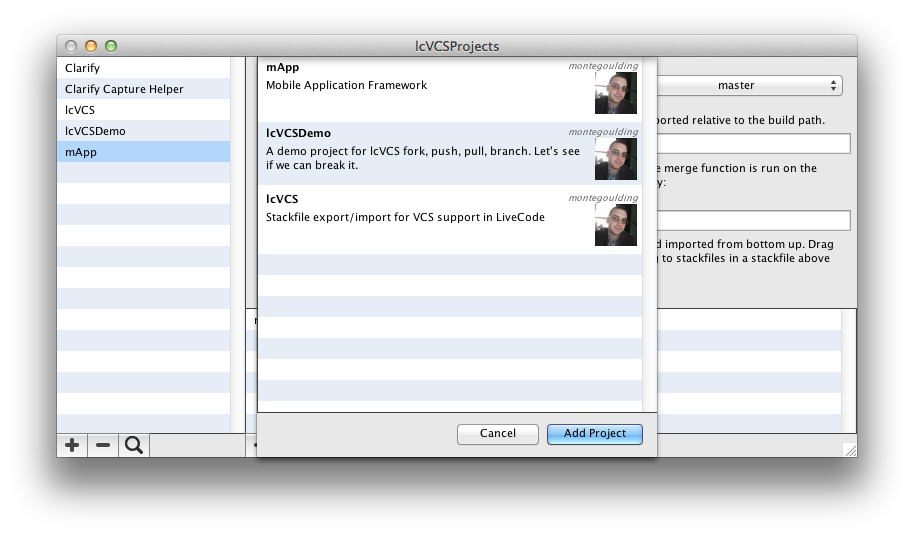
lcVCS GitHub search
lcVCS GitHub search (click to zoom)

So now lcVCS is both a way to help you version control your app, plugin or library and a way to deliver your open source plugin or library into the hands of other LiveCoders just busting to help you out with a contribution or two.

The lcVCS project is open source and licensed under the GPL 3 and is available on GitHub. Because lcVCS imports itself you will also need to get the current versions of the stackFiles which are available from the downloads page under a free or paid account at mergExt. The simplest thing to do is get the stackFiles then add lcVCS as a project so that you can update it as new versions become available. You will also need to install mergJSON (also available under a free or paid account) which is the super fast dual-licensed JSON parser external lcVCS is built on. While you’re there why not check out what mergExt can offer for your apps?

If you’re interested to start using lcVCS I am available for hands on consulting to help you and your team get up and running. There’s also some rules your project will need to follow in order to successfully transition:

If you use IDs in scripts anywhere (such as setting the icon of a button) then replace it with a name based reference.

Implement lcVCSExport handlers to ensure everything is set back to defaults during the export.

If you have any custom objects or libraries that maintain custom property sets that store IDs then implement a plugin to support it. The plugin api is quite simple and there’s a number of examples demonstrating their use. If possible contribute the plugin back to the project so we can maintain them centrally.

Limit object references between stackFiles where possible. Where it’s not possible ensure that there are no circular references. For example, stackFile A has an object reference to an object in stackFile B while stackFile B has an object reference to an object in stackFile A.

Order your stackFiles so that the stackFiles that have object references to objects in other stackFiles are imported and exported after the stackFiles they refer to. The stackFiles list in the lcVCSProjects stack can be re-ordered by drag and drop.

If you have object references to objects that no longer exist (such as icons referencing deleted images) clear the property.


read more
Heather LaineVersion Control for LiveCode

Android Surprise Package

by Heather Laine on September 6, 2013 2 comments

By Monte Goulding, published in revUp this week.

It probably comes as no surprise to most LiveCoders that I’ve been a little desperate for an Android Externals SDK for a while now. One of the most common pre-sale questions I field from mergExt customers is – do you have this for Android or that for Android. Up until this week I’ve had to say no, we can’t do that yet because RunRev haven’t released an SDK. Usually I cheekily ask them to harrass RunRev’s support team to help make it a higher priority (sorry Heather). It’s not just self interest though. I strongly believe that externals are a critical component of the platform enabling us to get the job done when the engine doesn’t cover a feature we need.

One of the great things for me about LiveCode going open source is I’ve been able to gain a much broader insight into how externals work by studying the api in the engine, RunRev’s externals and the lcidl compiler. For those that don’t know what the lcidl compiler is it’s an executable that reads in an interface definition file for the external and generates a C++ file that acts as a glue between the external implementation and the engine. One of the first things I noticed was it is quite easy to use the old externals SDK on iOS and Android for C or C++ externals. That’s how all of RunRev’s externals work cross platform and how mergJSON and mergMarkdown went cross platform. The problems start though when you want to access Android’s Java API.

We had some great discussions with Mark Waddingham, Mark Wieder and Jan Schenkel at RunRevLive 13 and on the Engine Contributors forum about how to implement the Java based externals, but things didn’t really start moving until Mark Waddingham implemented the core design of a support class, an implementation class and the JNI (Java Native Interface) glue binding it all to the engine. It was an exciting moment for me to test Mark’s demonstration external which consisted of the creation of a large button.

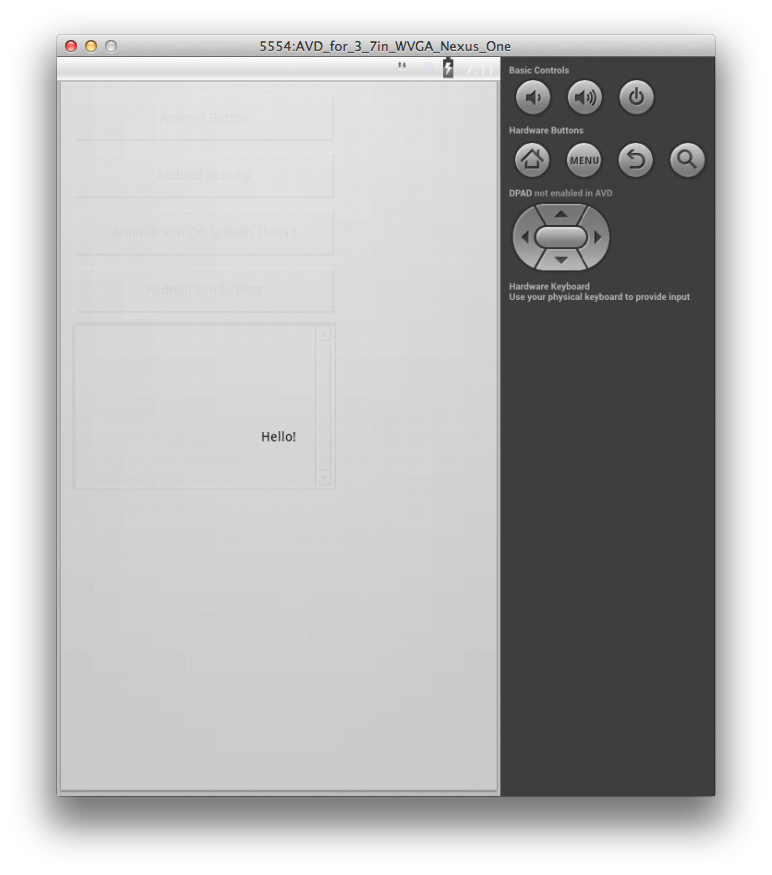
Say Hello to Android Externals… the first button

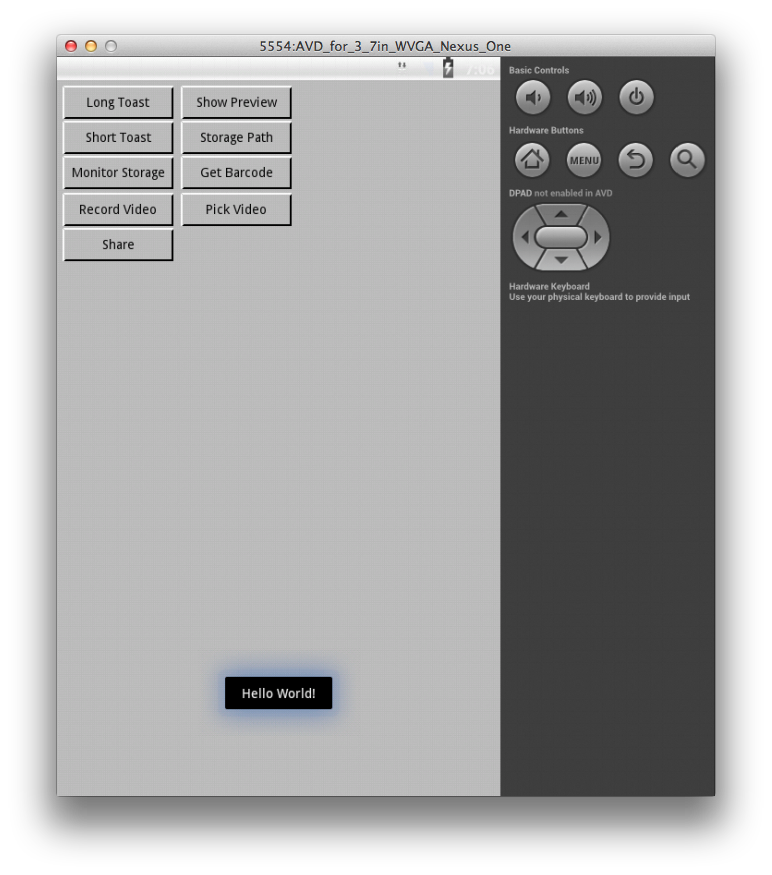
I immediately implemented a command lovingly named mergPopToast. A Toast on Android is a short message that is presented on screen for a few seconds before fading away.

Toasting the World

Having implemented my first command I wanted to get to work only to find that one of the most useful features in the iOS SDK, LCObjectPost, wasn’t fully implemented yet. You could post a message to an object but no parameters. So I went to work exploring JNI (something I hadn’t done before) and worked out how to do it. I submitted it to Mark and he promptly re-wrote it but I think my ideas helped a little bit… To test it all out I created mergStorageStartMonitoring which sends a callback (mergStorageStateChanged) whenever access to the sd card changes. I also added a function mergStoragePath to get the standard paths to the user’s public storage folders for good measure.

The next thing we needed was a way to start an Activity and get results back when it’s finished. Android applications are broken down to activities which can be thought of as cards with a specific feature. You start a new Activity with an Intent (to give it parameters for what it should do), when finished the user is returned to the Activity that started it with any results. The problem though was the engine’s Activity would handle all returns and not know what to do with the result from an Activity the external started. So we needed a way for the Java side of the engine and the Java side of the external to communicate directly. Starting the Activity and handing its result back to the external. When Mark commited an implementaton of an EngineAPI class I decided the perfect thing to test it on was barcode scanning by Intent (mergZXingGetBarcode). The function uses the Barcode Scanner or Barcode Scanner + app by Intent to scan. If the user doesn’t have the app it directs them to the Google Play store to get it.

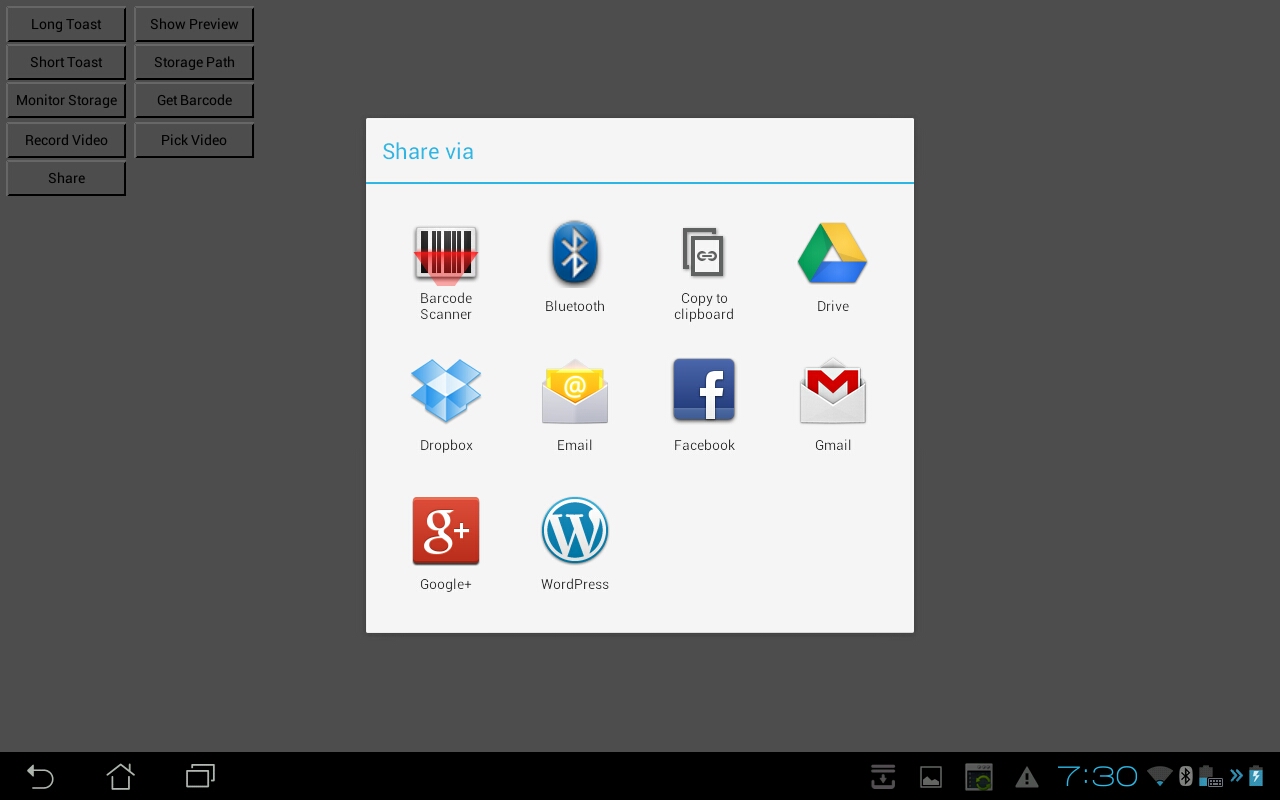
Once I got into the swing of things I implemented a few more features. Android’s sharing Intent is functionally equivalent to the UIActivityController on iOS (with the exception of an annoying bug in the Facebook app) so I implemented mergPopActivity for Android using that. I also implemented mergAVPick to record and pick video from the media library. A client also required the ability to view a PDF so I implemented mergDocShowPreview to open a file in one of the user’s apps that supports it.

This collection of features is now known as mergAndroid and is currently available as a bonus to mergExt Complete users. The list of features will grow over time as people need things and eventually as the Android Externals SDK matures the goal is to merge these features into the iOS externals available in the suite and attempt to provide as near feature parity as we can.

It’s worth re-iterating that we definitely wouldn’t have mergAndroid yet if LiveCode wasn’t open source which has enabled us to have code level discussions and contributions in order to get something functional. A couple of people have asked how they might get started building Android externals. There isn’t any documentation just yet and eventually I hope to create some templates for setting up an IntelliJ IDEA project with an ant based build but in brief:

  • checkout from this link, which is the most up to date until Mark merges my most recent pull request
  • build the android engine (there’s a shell script in the tools folder)
  • base your external on the sample revtestexternal in the repo
  • build using the shell script that comes with revtestexternal

Read the rest of the newsletter here.

read more
Heather LaineAndroid Surprise Package

Showcasing: Left Brain Media

by Arnaud on February 18, 2013 2 comments

Left Brain Media has developed an iOS app using LiveCode that is so good I just have to share it with you.

HIV and Your Heart was co-developed by the American Heart Association and the American Academy of HIV Medicine.  “HIV and Your Heart exists to help people living with HIV make positive changes in life for better heart health and overall wellness” they say.  

Left-Brain-Media-Use-of-LiveCode

Having HIV increases your risk for heart disease.  This informative app has over 90 minutes of positive, uplifting videos, from personal stories to advice from leading physicians, to help those living with HIV enjoy a long and healthy life.  You can interact with the app’s planning tool to set wellness goals and the built in tracking tool lets you follow the steps you need to take to reach those goals.

One of my favourite features of the app is how the user can chose to share the information via facebook, twitter or youtube and engage with others interested in or affected by HIV/AIDS.  Alternatively, the app has a full suite of confidentiality features; the desktop icon is just labelled ‘Your Heart’ and users can password protect the information if the wish to.

“This is a perfect example of how mobile apps are becoming part of everyday life.” says LiveCode Product Manager, Benjamin Beaumont.  

Mobile computing is one of the best ways for communities to share experiences, knowledge and ideas; the American Heart Association and the American Academy for HIV Medicine have done a brilliant job doing just that with this wonderfully instructive and interactive app.  LiveCode are proud of the small part we have played in its development.

HIV and Your Heart is a free app available to download from iTunes now.   

Do you have a made with LiveCode app you’re proud of?  Send it to us so that we can blog about it!  

read more
ArnaudShowcasing: Left Brain Media

Showcasing: Blue Mango Learning Systems

by Arnaud on February 15, 2013 No comments

LiveCode revolutionized development with its easy to use English-like language and rapid, compile-free workflow. Now one of RunRev’s long-standing customers is bringing that same fast, easy and effective approach to how you communicate online. 

Blue-Mango-Use-of-LiveCode-1

Since 2003 Blue Mango Learning Systems have used LiveCode to build great visual communication tools, which in turn help their clients create and deliver fantastic documentation. (The RunRev lessons portal, for example, is built using Blue Mango’s flagship product ScreenSteps and ScreenSteps Live and our customers have always been extremely happy with its performance.)

But effective visual communication is not just for documentation.  Using pictures in your daily communications means you spend less time explaining things.  Clarify is Blue Mango’s product that saves you time by organizing, clarifying and focusing your communications.

How Clarify Works


Blue-Mango-Use-of-LiveCode-2

Capture images

Capture screenshots, import graphics or add photos. Capture multiple images to create clear communications.


Blue-Mango-Use-of-LiveCode-3

Turn them into communications

Add annotations and text to your images.  

Annotations include:

– Arrows

– Rectangles

– Oval

– Highlight

– Sequence tools

– Text annotations

– Blur


Blue-Mango-Use-of-LiveCode-4

Share online or via email


It is easy to share your communications online via clarify-it.com (a free sharing service offered by Blue Mango), Dropbox, Evernote, or by email.


Built with LiveCode

We are really proud that Clarify was built using LiveCode.  Both RunRev and Blue Mango share a philosophy.  Blue Mango tells us that to communicate well we must:

– Be organized
– Be brief
– Be clear

Well, the same has always been true for programming and developing apps.


Stay Organized
Blue-Mango-Use-of-LiveCode-5

LiveCode’s clear process of ‘cards’ and ‘stacks’ keeps your programming organized and structured. 


Learn more about Cards and Stacks here


Be Brief

Supercharge your workflow. Make changes in real time. With LiveCode your application is always running, so any changes you make are seen live. This lets you create Apps and adapt to changing requirements in record time.

Blue-Mango-Use-of-LiveCode-6

                                           The Traditional Development Cycle. With each debugging
                                           you need to run the cycle again – slowing down your                                                                                                          development. 

Blue-Mango-Use-of-LiveCode-6                                           With LiveCode’s compile free cycle your chnages happen
                                           in real time.  No more waiting, no more delays. 

Be Clear

Writing in LiveCode is not like using other languages.  We use an English-like programming language so unlike other tools there is no arcane symbols, no difficult short hand, no complex syntax.

Your code is readable and understandable – even months after you’re written it.

Why choose LiveCode?

I asked Trevor DeVore, Clarify Developer and Blue Mango Director of Technology, why LiveCode was the perfect tool to use when developing programmes of this kind.  The reason, he told me, is becuase LiveCode is so versatile.

“Clarify has been released for both Mac and Windows. I need to be able to share as much code as possible between the two platforms if I’m going to be able to provide a quality product for our customers at release as well as going forward. Being able to use 98% of the code on both platforms without modification makes this feasible.

In addition, the ability to instantly test Clarify on Mac and Windows during development without any need to compile allows me to quickly iterate over features and fix bugs.”

– Trevor DeVore, Blue Mango Learning Systems

Clarify is available now for purchase on the Mac App Store.  Check out this great LiveCode-built app!    


read more
ArnaudShowcasing: Blue Mango Learning Systems

How to Teach Programming to Students Today

by Arnaud on February 14, 2013 No comments


There’s a hot discussion taking place about how to get young students interested in programming.  Not just interested, but loving it!  Teachers and administrators have been battling this challenge for years, but the fact is that engaging students early in technical areas such as Computer Studies is difficult to impossible, beyond perhaps one or two engineering obsessed students in the school.

However, with the number of IT related jobs growing by the thousands every year, and the tremendous need for mobile app developers for the long term, it is more important than ever to make Computer Studies as fundamental in K-12 curriculum as math, language, or science.  While it may sound impossible to get children to grasp the relevance of web and desktop development early on, the abundance of mobile apps and games have created new opportunities for educators.

Children are drawing, playing games, and watching videos on their parents’ mobile phones before learning their ABCs.  They begin to show interest in tinkering with devices in grade school. (Remember being the only one in your family who could program the TV remote when you were a kid?)  Many students want to create, build and fix anything they can get their hands on, but immediate gratification and relevance to their lives are critical factors for getting and keeping them engaged.  And a little fun thrown in helps a bunch.

Students as young as 10 are grasping the fundamentals of technology development, and teaching these young tinkerers to create simple games and mobile apps is helping breath new life into Computer Science curriculum.  At the core of much of this newfound passion for programming is LiveCode.  The easy to use platform makes it simple for educators to learn the language, and, for the first time, students just get it!

In response to the growing success of LiveCode in education, we have created a RunRev Education Microsite.  The site offers case studies, course materials for all grade levels, teacher training materials, forums and support, and free trials – everything educators needs to get started with LiveCode.

Take a look at Gracemount High School’s informative white paper and please share your own stories as well!

read more
ArnaudHow to Teach Programming to Students Today

Showcasing: EuroTalk

by Arnaud on February 13, 2013 No comments

Language learning specialists EuroTalk are experts in their field with 20 years of publishing experience and over 10 million customers.  EuroTalk uses LiveCode during the authoring process for many of their titles, and has been working for a number of years in Malawi together with the Scottish Government looking at different solutions for delivering education to primary schools. 

These are rural schools with no electricity and very large class sizes, and often the teachers have very few resources.  All classes at standard 1 and 2 have at least 250 children and this particularly school we’re blogging about has 5000 children.  Some nearby primary schools have 18 to 20 thousand children.

A LiveCode created app, the Chichewa Learning App has been a great help to the children and provides the key words needed and a fast, scientific way of remembering them.  Described by users as:

“Fun intelligent interactive learning games.  Worth the money.”

“Unlike many other apps, this one makes learning fun and doesn’t get boring.” 

EuroTalk-Use-of-LiveCode-1

HOW IT WORKS

This interactive product is the result of extensive research into how the brain learns fastest.  It uses:

– Images: to stimulate both halves of the brains, visual as well as logical;

– Fun quizzes: because we remember best what we’re interested in;

– Speech, recording and playback: to perfect your accent by comparing with native speakers;

– A point scoring system: that gives feedback on progress and rewards success.

Here are a few pictures of the children who don’t speak much English but took to the Chichewa Learning App almost instantly.   

EuroTalk-Use-of-LiveCode-2 

EuroTalk-Use-of-LiveCode-3

And this girl typed her name into the device and was so proud to see it on the unit menu.

EuroTalk-Use-of-LiveCode-5 

EuroTalk-Use-of-LiveCode-4

 “If we can use tools like LiveCode to 
 develop and iterate quickly, and use 
 handheld devices to deliver, I think 
 we are on the verge of a revolution in 
 terms of delivering education.”

Read on to find out more about EuroTalk and their successful Maths app for children ages 3 – 5!  


read more
ArnaudShowcasing: EuroTalk

Reporting back from Bett 2013

by Arnaud on February 7, 2013 No comments

Bett was held at the Custom House in London Excel this year and was a veritable feast of the great and the good. With over 35,000 attendees expected I spoke to people from many parts of the world.  The DLR was so overloaded with people attending that at one point the service was stopped at Canning Station and everyone had to walk to Custom House.

With all the news coverage about how vital it is for teenage students to learn how to code, I was surprised by the lack of relevant coding platforms at Bett 2013.  This year the show seemed to be very well patronised by data and analytics – gathering data, measuring data and reporting on data.  Whilst that is all good and well, how are teenagers going to learn to code?  The app market continues to prosper, students are tech savvy, have increasingly sophisticated technology in their pockets and the importance of knowing how to code has never been greater. 

It must surely be both a challenging and rewarding time to be a teacher.  Today old school meets new school in the classroom and the potential for amazing results is just waiting to happen.  All that is needed is some creative thinking from the top down as well as the bottom up and the ability to let go of the past and embrace the new. 

Stephen_Heppel_BettStephen Heppell, was inspirational with his approach to new ways of learning.  Stephen’s approach is to teach students how to learn then trust them to determine what works best for them in terms of classroom environment and use of technology.  It was great to see the ease with which lots of youngsters used Scratch on his stand at Bett.  Coding is close to Stephens’s heart and when LiveCode’s ancestor, HyperCard, came to market in the late 80’s Stephen created a HyperCard stack with which it was launched.  Stephen is a breath of fresh air in the Digital World of learning and his approach has a proven track record of success. 

Nao_Android_Machine_BettDell had a Formula 1 racing car on their stand sitting next to a racing simulator which was hugely
popular.  The new Windows 8 Dell Tablet is ideal for using apps build on LiveCode by students and many students and teachers who tried it out for themselves, thought so too. 

Everyone fell in love with the very human Nao Android Robot it will be interesting to watch how this evolves to be used as a teaching tool.  The Active Robots folk were keen to try out LiveCode to see if it could drive the Nao so watch this space it may just happen

Looking forward to Bett 2014!


read more
ArnaudReporting back from Bett 2013